Kubernetes Plugin
(Experimental!)
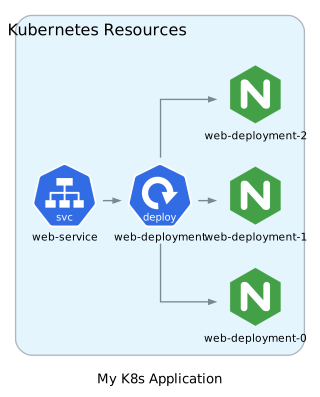
The Kubernetes plugin enables bidirectional conversion between Kubernetes YAML manifests and architecture diagrams. Visualize your container orchestration setups or generate Kubernetes deployment configurations from diagrams.
Installation
npm install @diagrams-js/plugin-kubernetes
Quick Start
Import from Kubernetes YAML
import { Diagram } from "diagrams-js";
import { kubernetesPlugin } from "@diagrams-js/plugin-kubernetes";

const diagram = Diagram("My K8s Application");

// Register the plugin instance
await diagram.registerPlugins([kubernetesPlugin]);

// Import from Kubernetes YAML
const k8sYaml = `
apiVersion: apps/v1
kind: Deployment
metadata:
  name: web-deployment
  namespace: default
spec:
  replicas: 3
  selector:
    matchLabels:
      app: web
  template:
    spec:
      containers:
      - name: web
        image: nginx:latest
        ports:
        - containerPort: 80
---
apiVersion: v1
kind: Service
metadata:
  name: web-service
  namespace: default
spec:
  selector:
    app: web
  ports:
  - port: 80
    targetPort: 80
`;

await diagram.import(k8sYaml, "kubernetes");

// Render the diagram
const svg = await diagram.render();
Export to Kubernetes YAML
import { Diagram, Node } from "diagrams-js";
import { kubernetesPlugin } from "@diagrams-js/plugin-kubernetes";

const diagram = Diagram("My K8s Application");

// Create nodes with Kubernetes metadata
const deployment = diagram.add(Node("web-deployment"));
deployment.metadata = {
  kubernetes: {
    kind: "Deployment",
    namespace: "default",
    spec: {
      replicas: 3,
      selector: { matchLabels: { app: "web" } },
      template: {
        spec: {
          containers: [
            {
              name: "web",
              image: "nginx:latest",
              ports: [{ containerPort: 80 }],
            },
          ],
        },
      },
    },
  },
};

const service = diagram.add(Node("web-service"));
service.metadata = {
  kubernetes: {
    kind: "Service",
    namespace: "default",
    spec: {
      selector: { app: "web" },
      ports: [{ port: 80 }],
    },
  },
};

// Create relationship
service.to(deployment);

// Register plugin and export
await diagram.registerPlugins([kubernetesPlugin]);
const k8sYaml = await diagram.export("kubernetes");

console.log(k8sYaml);
Features
Import Capabilities
- Parse Kubernetes YAML manifests - Supports single and multi-document YAML
- Smart icon mapping - Automatically maps Kubernetes resources to appropriate provider icons
- Cluster organization - Groups resources by namespace into clusters
- Service selector visualization - Creates edges for service-to-deployment relationships
- Container visualization - Creates child nodes for containers within deployments
- Multi-file import - Import multiple manifest files into separate clusters
Supported Resource Types
The plugin supports all major Kubernetes resource types:
Workloads:
- Deployment
- StatefulSet
- DaemonSet
- ReplicaSet
- Pod
- Job
- CronJob
Services & Networking:
- Service
- Ingress
- NetworkPolicy
Storage:
- ConfigMap
- Secret
- PersistentVolume
- PersistentVolumeClaim
- StorageClass
RBAC:
- Role
- RoleBinding
- ClusterRole
- ClusterRoleBinding
- ServiceAccount
Cluster:
- Namespace
- Node
- HorizontalPodAutoscaler
Export Capabilities
- Generate valid Kubernetes manifests - Exports to standard Kubernetes YAML
- Resource configuration - Includes replicas, selectors, ports, environment, volumes, etc.
- Service selector reconstruction - Rebuilds service selectors from diagram relationships
- Multi-document support - Exports multiple resources in a single YAML file
Resource to Icon Mapping
The plugin automatically maps common Kubernetes resources to provider icons:
| Resource | Icon |
|---|---|
| Deployment | k8s compute Deploy |
| StatefulSet | k8s compute STS |
| DaemonSet | k8s compute DS |
| ReplicaSet | k8s compute RS |
| Pod | k8s compute Pod |
| Job | k8s compute Job |
| CronJob | k8s compute Cronjob |
| Service | k8s network SVC |
| Ingress | k8s network Ing |
| NetworkPolicy | k8s network Netpol |
| Endpoint | k8s network Ep |
| ConfigMap | k8s podconfig CM |
| Secret | k8s podconfig Secret |
| PersistentVolume | k8s storage PV |
| PersistentVolumeClaim | k8s storage PVC |
| StorageClass | k8s storage SC |
| Volume | k8s storage Vol |
| Role | k8s rbac Role |
| RoleBinding | k8s rbac RB |
| ClusterRole | k8s rbac CRole |
| ClusterRoleBinding | k8s rbac CRB |
| ServiceAccount | k8s rbac SA |
| Namespace | k8s group NS |
Images that don't match any pattern use a generic container icon for container nodes.
Configuration
Custom Resource Mappings
You can customize which icons are used for specific Kubernetes resources. The plugin supports multiple mapping formats and checks them in this priority order:
- Resource name (e.g.,
my-custom-app) - takes precedence - Resource kind (e.g.,
Deployment,Service) - fallback
import { Diagram } from "diagrams-js";
import { createKubernetesPlugin } from "@diagrams-js/plugin-kubernetes";

const diagram = Diagram("My K8s Application");

// Create plugin with custom resource mappings
const plugin = createKubernetesPlugin({
  defaultNamespace: "production",
  imageMappings: {
    // 1. Provider icon mapping - use built-in provider icons
    "my-custom-deployment": {
      provider: "onprem",
      type: "compute",
      resource: "Server",
    },
    "company-db": {
      provider: "onprem",
      type: "database",
      resource: "Postgresql",
    },

    // 2. Direct URL string - use a custom image URL
    "my-frontend": "https://example.com/react-icon.png",

    // 3. URL object - same as string but as object
    "my-backend": {
      url: "https://example.com/node-icon.svg",
    },

    // 4. Iconify icon - use icons from Iconify (https://iconify.design/)
    // Format: { iconify: "prefix:name" }
    "custom-app": {
      iconify: "logos:kubernetes",
    },
    "redis-cache": {
      iconify: "logos:redis",
    },
    "docker-service": {
      iconify: "logos:docker",
    },
  },
});

await diagram.registerPlugins([plugin]);
Iconify Icons
The plugin supports Iconify icons, which provides access to 200,000+ open source icons. Use the { iconify: "prefix:name" } format:
- Browse icons at https://icon-sets.iconify.design/
- Common prefixes:
logos:(technology logos),mdi:(Material Design),fluent-emoji:(emoji) - Examples:
{ iconify: "logos:kubernetes" }- Kubernetes logo{ iconify: "logos:redis" }- Redis logo{ iconify: "mdi:server" }- Server icon{ iconify: "logos:docker" }- Docker logo
Icons are automatically fetched from the Iconify API and embedded in the diagram.
Mapping Priority
The plugin first checks for a mapping by the resource name, then falls back to the resource kind:
# deployment.yaml
apiVersion: apps/v1
kind: Deployment
metadata:
  name: my-api
spec: ...
// This mapping by RESOURCE NAME takes precedence
imageMappings: {
  "my-api": { iconify: "logos:aws" }  // Shows AWS icon instead of Deployment
}

// This mapping by KIND is the fallback
imageMappings: {
  "Deployment": { iconify: "logos:kubernetes" }  // Used if no "my-api" mapping
}
Examples
Visualize a Microservices Architecture
import { Diagram } from "diagrams-js";
import { kubernetesPlugin } from "@diagrams-js/plugin-kubernetes";

const k8sYaml = `
apiVersion: apps/v1
kind: Deployment
metadata:
  name: frontend
  namespace: production
spec:
  replicas: 3
  selector:
    matchLabels:
      app: frontend
  template:
    spec:
      containers:
      - name: frontend
        image: nginx:alpine
        ports:
        - containerPort: 80
---
apiVersion: v1
kind: Service
metadata:
  name: frontend-service
  namespace: production
spec:
  selector:
    app: frontend
  ports:
  - port: 80
---
apiVersion: apps/v1
kind: Deployment
metadata:
  name: api
  namespace: production
spec:
  replicas: 2
  selector:
    matchLabels:
      app: api
  template:
    spec:
      containers:
      - name: api
        image: node:18
        ports:
        - containerPort: 3000
---
apiVersion: v1
kind: Service
metadata:
  name: api-service
  namespace: production
spec:
  selector:
    app: api
  ports:
  - port: 3000
---
apiVersion: apps/v1
kind: StatefulSet
metadata:
  name: postgres
  namespace: production
spec:
  serviceName: postgres
  replicas: 1
  selector:
    matchLabels:
      app: postgres
  template:
    spec:
      containers:
      - name: postgres
        image: postgres:15
`;

const diagram = Diagram("Production Architecture");
await diagram.registerPlugins([kubernetesPlugin]);
await diagram.import(k8sYaml, "kubernetes");

const svg = await diagram.render();
Import Multiple Manifest Files
Compare staging and production configurations:
const stagingManifest = `
apiVersion: apps/v1
kind: Deployment
metadata:
  name: web
  namespace: staging
spec:
  replicas: 1
  template:
    spec:
      containers:
      - name: web
        image: myapp:staging
`;

const productionManifest = `
apiVersion: apps/v1
kind: Deployment
metadata:
  name: web
  namespace: production
spec:
  replicas: 5
  template:
    spec:
      containers:
      - name: web
        image: myapp:latest
`;

const diagram = Diagram("Environment Comparison");
await diagram.registerPlugins([kubernetesPlugin]);

// Each manifest gets its own cluster
await diagram.import([stagingManifest, productionManifest], "kubernetes");
Export with Custom Metadata
import { Diagram, Node } from "diagrams-js";
import { kubernetesPlugin } from "@diagrams-js/plugin-kubernetes";

const diagram = Diagram("Production Stack");

const deployment = diagram.add(Node("api"));
deployment.metadata = {
  kubernetes: {
    kind: "Deployment",
    namespace: "production",
    labels: {
      app: "api",
      tier: "backend",
      env: "production",
    },
    spec: {
      replicas: 5,
      selector: {
        matchLabels: { app: "api" },
      },
      template: {
        spec: {
          containers: [
            {
              name: "api",
              image: "myapp:latest",
              resources: {
                limits: {
                  cpus: "1000m",
                  memory: "512Mi",
                },
                requests: {
                  cpus: "200m",
                  memory: "256Mi",
                },
              },
            },
          ],
        },
      },
    },
  },
};

await diagram.registerPlugins([kubernetesPlugin]);
const k8sYaml = await diagram.export("kubernetes");
Round-trip Conversion
Import a manifest, modify it, then export back:
const diagram = Diagram("Modified Stack");
await diagram.registerPlugins([kubernetesPlugin]);

// Import existing manifest
await diagram.import(existingK8sYaml, "kubernetes");

// Add a new resource
const monitoring = diagram.add(Node("prometheus"));
monitoring.metadata = {
  kubernetes: {
    kind: "Deployment",
    namespace: "monitoring",
    spec: {
      replicas: 1,
      selector: { matchLabels: { app: "prometheus" } },
      template: {
        spec: {
          containers: [
            {
              name: "prometheus",
              image: "prom/prometheus:latest",
              ports: [{ containerPort: 9090 }],
            },
          ],
        },
      },
    },
  },
};

// Export modified configuration
const updatedYaml = await diagram.export("kubernetes");
API Reference
kubernetesPlugin
A pre-created plugin instance without configuration. This is the recommended way to use the plugin when you don't need custom configuration.
import { kubernetesPlugin } from "@diagrams-js/plugin-kubernetes";

// ✅ Use the pre-created instance
await diagram.registerPlugins([kubernetesPlugin]);
createKubernetesPlugin(config?)
Factory function for creating a Kubernetes plugin with custom configuration. Use this when you need to customize the plugin behavior.
import { createKubernetesPlugin } from "@diagrams-js/plugin-kubernetes";

// ✅ Create plugin with custom configuration
const customPlugin = createKubernetesPlugin({
  defaultNamespace: "production",
  imageMappings: {
    "custom-app": { iconify: "logos:kubernetes" },
  },
});

await diagram.registerPlugins([customPlugin]);
Parameters:
config(optional):KubernetesPluginConfigdefaultNamespace: Default namespace for exports (default: "default")imageMappings: Custom resource to icon mappings (see Configuration section)
Returns: DiagramsPlugin - The plugin instance
Complete Example with All Mapping Types:
const plugin = createKubernetesPlugin({
  defaultNamespace: "production",
  imageMappings: {
    // Provider icons - use built-in diagrams-js icons
    "my-deployment": { provider: "k8s", type: "compute", resource: "Deploy" },
    "my-db": { provider: "k8s", type: "storage", resource: "Sts" },

    // Custom URL - use any image URL
    frontend: "https://example.com/react.png",
    backend: { url: "https://example.com/node.svg" },

    // Iconify icons - 200,000+ icons available
    kubernetes: { iconify: "logos:kubernetes" },
    redis: { iconify: "logos:redis" },
    docker: { iconify: "logos:docker" },
  },
});

await diagram.registerPlugins([plugin]);
Plugin Capabilities
The plugin provides two capabilities:
Importer
- Name:
kubernetes - Extensions:
.yml,.yaml - MIME Types:
text/yaml,application/x-yaml
Exporter
- Name:
kubernetes - Extension:
.yaml - MIME Type:
text/yaml
Exported Types
The plugin exports the ImageMappings type for TypeScript users:
import { createKubernetesPlugin, type ImageMappings } from "@diagrams-js/plugin-kubernetes";

// Type your image mappings for better IDE support and type checking
const mappings: ImageMappings = {
  "my-deployment": { provider: "k8s", type: "compute", resource: "Deploy" },
  "my-app": { iconify: "logos:kubernetes" },
  "custom-resource": "https://example.com/icon.svg",
};

const plugin = createKubernetesPlugin({ imageMappings: mappings });
Best Practices
1. Use Descriptive Resource Names
Resource names become node labels, so use clear, descriptive names:
# ✅ Good
apiVersion: apps/v1
kind: Deployment
metadata:
  name: user-service
spec:
  ...

# ❌ Avoid
apiVersion: apps/v1
kind: Deployment
metadata:
  name: svc1
spec:
  ...
2. Store Metadata for Round-trip
When creating nodes programmatically, store Kubernetes metadata to enable export:
const node = diagram.add(Node("my-deployment"));
node.metadata = {
  kubernetes: {
    kind: "Deployment",
    namespace: "default",
    spec: {
      replicas: 3,
      selector: { matchLabels: { app: "my-app" } },
      template: {
        spec: {
          containers: [
            {
              name: "app",
              image: "nginx:latest",
              ports: [{ containerPort: 80 }],
            },
          ],
        },
      },
    },
  },
};
3. Handle Service Selectors
The plugin automatically creates edges when Service selectors match Deployment labels:
# Deployment labels
apiVersion: apps/v1
kind: Deployment
metadata:
  name: web
  labels:
    app: web
    tier: frontend

# Service selector matches
apiVersion: v1
kind: Service
metadata:
  name: web-service
spec:
  selector:
    app: web  # Creates edge from service to deployment
  ports:
  - port: 80
4. Use Namespaces
Organize resources with namespaces for better visualization:
apiVersion: apps/v1
kind: Deployment
metadata:
  name: api
  namespace: production

apiVersion: apps/v1
kind: Deployment
metadata:
  name: api
  namespace: staging
5. Multi-document YAML
Use --- separator for multiple resources in a single file:
apiVersion: apps/v1
kind: Deployment
metadata:
  name: web
---
apiVersion: v1
kind: Service
metadata:
  name: web-service
---
apiVersion: v1
kind: ConfigMap
metadata:
  name: web-config
Troubleshooting
Plugin Not Found
Make sure to register the plugin before using import/export:
// ✅ Correct order
await diagram.registerPlugins([kubernetesPlugin]);
await diagram.import(k8sYaml, "kubernetes");

// ❌ Wrong order
await diagram.import(k8sYaml, "kubernetes"); // Will fail!
await diagram.registerPlugins([kubernetesPlugin]);
Type Errors with Metadata
The metadata property is now typed as Record<string, any>, so you can access it directly without type assertions:
node.metadata = {
  kubernetes: { ... }
};
Missing Icons
The plugin maps common Kubernetes resources to provider icons automatically. For custom resources or when you want specific icons:
- Check if it matches one of the patterns in the mapping table
- The plugin will use a generic k8s API icon for unrecognized resources
- Use custom resource mappings to specify icons:
const plugin = createKubernetesPlugin({
  imageMappings: {
    // Option 1: Use a provider icon
    "my-deployment": { provider: "k8s", type: "compute", resource: "Deploy" },

    // Option 2: Use a custom image URL
    "my-app": "https://example.com/icon.svg",

    // Option 3: Use Iconify (200,000+ icons!)
    "custom-app": { iconify: "logos:kubernetes" },
  },
});
Import Fails
Ensure your Kubernetes YAML is valid:
// Validate before importing
try {
  await diagram.import(k8sYaml, "kubernetes");
} catch (error) {
  console.error("Import failed:", error.message);
}
Required fields for a valid Kubernetes resource:
apiVersionkindmetadata.name
Runtime Support
The Kubernetes plugin supports all diagrams-js runtimes:
- Browser ✅
- Node.js ✅
- Deno ✅
- Bun ✅
Further Reading
- Plugin System Overview - Learn about the diagrams-js plugin system
- Docker Compose Plugin - For Docker Compose import/export
- Kubernetes Documentation - Official Kubernetes docs