Quick Start
Get started with diagrams-js in just a few lines of code.
Basic Diagram
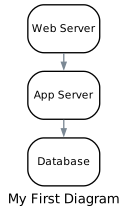
Create a simple diagram with nodes and connections:
import { Diagram, Node } from "diagrams-js";

// Create a diagram
const diagram = Diagram("My First Diagram", {
  // Diagram options
  direction: "TB", // Top to Bottom
});

// Add nodes
const web = diagram.add(Node("Web Server"));
const app = diagram.add(Node("App Server"));
const db = diagram.add(Node("Database"));

// Connect them
web.to(app).to(db);

// Render to SVG
const svg = await diagram.render();

// Clean up
Using Cloud Providers
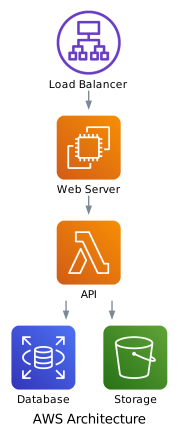
Import nodes from cloud providers to get automatic icons:
import { Diagram } from "diagrams-js";
import { EC2, Lambda } from "diagrams-js/aws/compute";
import { RDS } from "diagrams-js/aws/database";
import { S3 } from "diagrams-js/aws/storage";
import { ALB } from "diagrams-js/aws/network";

const diagram = Diagram("AWS Architecture", { direction: "TB" });

// Create nodes with icons
const lb = diagram.add(ALB("Load Balancer"));
const web = diagram.add(EC2("Web Server"));
const api = diagram.add(Lambda("API"));
const db = diagram.add(RDS("Database"));
const storage = diagram.add(S3("Storage"));

// Connect them
lb.to(web).to(api);
api.to([db, storage]);

// Render to SVG
const svg = await diagram.render();
Browser Integration
Display the diagram directly in the browser:
<div id="diagram"></div>

<script type="module">
  import { Diagram } from "diagrams-js";
  import { EC2 } from "diagrams-js/aws/compute";

  const diagram = Diagram("Simple", { direction: "TB" });
  const server = diagram.add(EC2("Server"));

  const svg = await diagram.render();
  document.getElementById("diagram").innerHTML = svg;
</script>
Node.js Usage
Save diagrams to files in Node.js:
import { Diagram } from "diagrams-js";
import { EC2 } from "diagrams-js/aws/compute";
import { writeFileSync } from "fs";

const diagram = Diagram("My Diagram");
diagram.add(EC2("Server"));

const svg = await diagram.render();
writeFileSync("diagram.svg", svg);
Key Concepts
- Diagram: The container for your architecture diagram
- Nodes: Components like servers, databases, and services
- Connections: Relationships between nodes using
.to(),.from(), and.with() - Providers: Cloud service categories (AWS, Azure, GCP, etc.)
Next Steps
- Learn about Diagrams in detail
- Explore Nodes and connections
- See all providers and their services
- Check out complete examples