Diagram Diff
Compare two versions of a diagram visually to see what changed. The diff feature highlights added, removed, and modified elements with color-coded overlays in a side-by-side view.
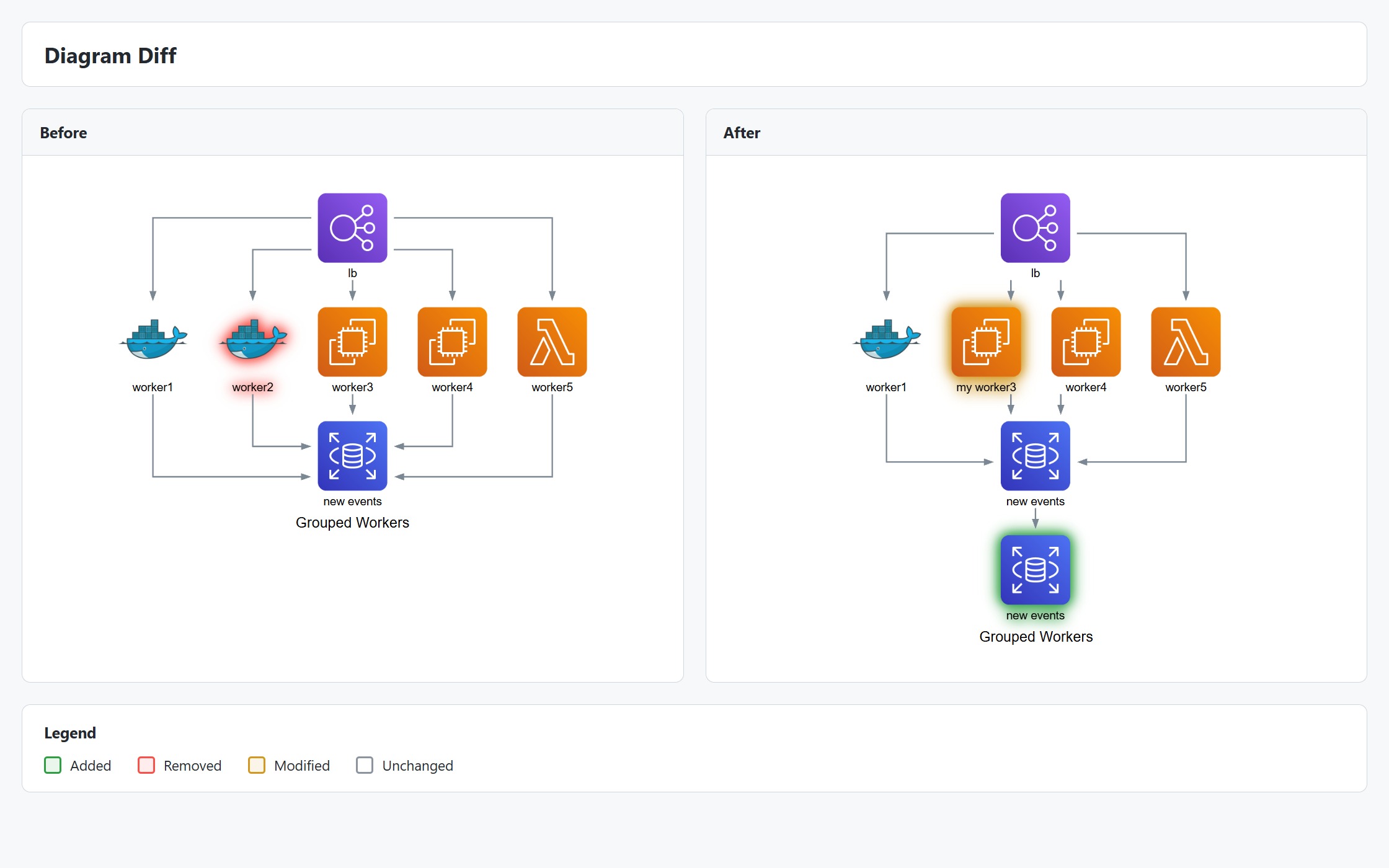
Overview
When you version control your diagram code, you can see text diffs. But for architecture diagrams, a visual diff is much more useful:
- Code reviews: See exactly what infrastructure changed in a PR
- Documentation: Show evolution of system architecture
- Auditing: Track what was added or removed between deployments
Quick Start
import { Diagram, computeDiff, renderDiff } from "diagrams-js";
import { writeFileSync } from "fs";

// Load two versions of your diagram
const before = JSON.parse(await fs.readFile("arch-v1.json", "utf8"));
const after = JSON.parse(await fs.readFile("arch-v2.json", "utf8"));

// Compute the diff
const diff = computeDiff(before, after);
console.log(diff.summary);
// { added: 2, removed: 1, modified: 3, unchanged: 5 }

// Render visual diff as HTML
const html = await renderDiff(diff, before, after, { format: "html" });
await fs.writeFile("diff.html", html);
Or use the convenience static method:
const html = await Diagram.renderDiff(before, after, { format: "html" });
Computing Diffs
The computeDiff function compares two diagrams and returns a detailed diff result:
import { computeDiff, type DiagramDiffResult } from "diagrams-js";

const diff: DiagramDiffResult = computeDiff(before, after);
Diff Result Structure
{
  // Map of node diffs by node ID
  nodes: Map<string, NodeDiff>;

  // Map of edge diffs by composite key
  edges: Map<string, EdgeDiff>;

  // Cluster diffs (recursive)
  clusters: ClusterDiff[];

  // Summary counts
  summary: {
    added: number;
    removed: number;
    modified: number;
    unchanged: number;
  };

  // Diagram-level changes (name, theme, direction, etc.)
  meta: {
    name?: { before?: string; after?: string };
    theme?: { before?: string; after?: string };
    direction?: { before?: string; after?: string };
    // ...
  };
}
Node Diff Types
Each node in the diff has a kind indicating what changed:
| Kind | Description | Has Before | Has After |
|---|---|---|---|
added | New node in after version | ❌ | ✅ |
removed | Node deleted in after version | ✅ | ❌ |
modified | Node properties changed | ✅ | ✅ |
unchanged | No changes | ✅ | ✅ |
const nodeDiff = diff.nodes.get("web-server");

if (nodeDiff?.kind === "modified") {
  console.log("Changes:", nodeDiff.changes);
  // ["label: \"Web\" → \"Web v2\"", "type: \"EC2\" → \"Lambda\""]
}
Node Matching
Nodes are matched using a three-phase approach:
- Fingerprint Matching: Nodes with identical
(label, provider, type, resource)are matched directly - Label Fingerprint + Edge Connectivity: Unmatched nodes with same
(provider, type, resource)are matched using edge connectivity to disambiguate multiple candidates - Simple Label Fingerprint: Remaining unmatched nodes are matched 1:1 by
(provider, type, resource)
Label Change Detection
When nodes have the same (provider, type, resource) but different labels:
- Same label →
unchanged - Different labels →
modified(label change)
This means if you rename a node (e.g., "worker1" → "worker1-prod") while keeping the same provider and type, it's detected as modified rather than removed + added.
Note: Nodes with completely different labels but same type are treated as separate nodes (removed + added), not modifications. The algorithm uses edge connectivity to determine if nodes should be paired.
Rendering Diffs
The renderDiff function generates a visual representation:
const html = await renderDiff(diff, before, after, options);
Output Formats
HTML (Recommended)
Self-contained HTML page with:
- Side-by-side diagram panels
- Color-coded elements (green=added, red=removed, amber=modified)
- Summary header with change counts
- Legend
- Hover tooltips showing specific changes
const html = await renderDiff(diff, before, after, {
  format: "html",
  theme: "light", // or "dark"
  layout: "side-by-side", // or "stacked"
  showLegend: true,
  showSummary: true,
  hoverDetails: true,
});
SVG
Combined SVG with both diagrams:
const svg = await renderDiff(diff, before, after, {
  format: "svg",
  showLegend: true,
});
Display Options
Control how unchanged elements appear:
// Show unchanged elements normally (default)
{
  showUnchanged: "show";
}

// Dim unchanged elements
{
  showUnchanged: "dim";
}

// Hide unchanged elements entirely
{
  showUnchanged: "hide";
}
Diff Options
Customize the diff computation:
const diff = computeDiff(before, after, {
  // Ignore position/layout changes (default: true)
  ignore: { position: true },

  // Ignore all metadata changes
  ignore: { metadata: true },

  // Ignore specific metadata keys
  ignore: { metadata: ["cpu", "memory"] },

  // Ignore specific Graphviz attributes
  ignore: { attrs: ["color", "fillcolor"] },

  // Custom node matching function
  matchNodes: (a, b) => a.metadata?.resourceId === b.metadata?.resourceId,
});
Complete Example
import { Diagram, computeDiff, renderDiff } from "diagrams-js";
import { EC2, Lambda } from "diagrams-js/aws/compute";
import { RDS } from "diagrams-js/aws/database";
import { S3 } from "diagrams-js/aws/storage";
import { writeFileSync } from "fs";

// Version 1: Traditional architecture
const v1 = Diagram("Architecture v1", { direction: "TB" });
const web1 = v1.add(EC2("Web Server"));
const db1 = v1.add(RDS("Database"));
web1.to(db1);

// Version 2: Serverless migration
const v2 = Diagram("Architecture v2", { direction: "TB" });
const web2 = v2.add(Lambda("API Handler")); // Changed from EC2
const db2 = v2.add(RDS("Database")); // Same
const storage = v2.add(S3("Assets")); // New
web2.to(db2);
web2.to(storage);

// Compute and render diff
const diff = computeDiff(v1.toJSON(), v2.toJSON());

console.log("Changes:", diff.summary);
// Changes: { added: 1, removed: 0, modified: 1, unchanged: 1 }

const html = await renderDiff(diff, v1.toJSON(), v2.toJSON(), {
  format: "html",
  theme: "light",
  showUnchanged: "show", // or "dim" to dim unchanged, "hide" to hide them
});

writeFileSync("architecture-diff.html", html);
The resulting HTML will show:
- Green: New S3 "Assets" node
- Amber: Changed EC2 → Lambda node
- Dimmed: Unchanged RDS node
Git Integration with CLI
Use the diagrams CLI for automatic diff generation in git workflows:
# Install globally
npm install -g @diagrams-js/cli

# Compare current file with HEAD
diagrams diff HEAD diagram.json -o diff.html

# Also compare SVG
diagrams diff HEAD diagram.svg -o diff.html

# Generate diff for PR
diagrams diff main...feature diagram.json -o diff.html

# Show in terminal (ASCII preview)
diagrams diff HEAD diagram.json --format terminal
CLI Options
diagrams diff <ref> <file> [options]

Options:
  -o, --output <file>     Output file (default: <filename>-diff.html)
  -f, --format <format>   Output format: html, svg, json, terminal (default: html)
  -t, --theme <theme>     Theme: light, dark (default: light)
  -l, --layout <layout>   Layout: side-by-side, stacked (default: side-by-side)
  --show-unchanged        Show unchanged elements (default: true)
  --no-show-unchanged     Hide unchanged elements
  --ignore-position       Ignore position changes (default: true)
  --no-ignore-position    Include position changes
Best Practices
-
Export JSON for versioning: Save
diagram.toJSON()alongside your code for reproducible diffs:await diagram.save("architecture.json", { format: "json" }); -
Ignore cosmetic changes: Use
ignoreoptions to focus on meaningful changes:computeDiff(before, after, {
ignore: { position: true, attrs: ["color"] },
}); -
Review metadata changes: Infrastructure specs (CPU, memory) in metadata will be diffed by default. Review these in
nodeDiff.changes.
Troubleshooting
Nodes showing as removed+added instead of modified
This is the expected behavior when:
- The node has a different
labelAND different edge connectivity - The node has different
provider,type, orresource
Nodes are only matched as modified when they share the same (provider, type, resource) and have matching edge connectivity patterns. If you rename a node and significantly change its connections, it will be treated as removed + added.
To force a match as modified, ensure the node keeps the same provider, type, resource, and similar edge connectivity.
Edges not matching after node rename
Edges are matched using resolved node IDs. If a node is detected as modified, edges connected to it should still match. If not, check that the fingerprint matching succeeded.
Layout changes cluttering the diff
Set ignore: { position: true } (default) to ignore layout/position changes and focus on structural changes.
API Reference
computeDiff(before, after, opts?)
Computes the diff between two diagram versions.
Parameters:
before:DiagramJSON | Diagram— Original diagramafter:DiagramJSON | Diagram— Updated diagramopts?:DiffOptions— Diff computation options
Returns: DiagramDiffResult
renderDiff(diff, before, after, opts?)
Renders a visual diff.
Parameters:
diff:DiagramDiffResult— Computed diff fromcomputeDiff()before:DiagramJSON | Diagram— Original diagramafter:DiagramJSON | Diagram— Updated diagramopts?:RenderDiffOptions— Rendering options
Returns: Promise<string> — HTML or SVG string
Diagram.diff(before, after, opts?)
Static convenience method equivalent to computeDiff().
Diagram.renderDiff(before, after, opts?)
Static convenience method that computes and renders in one call.
See Also
- JSON Serialization — Export diagrams to JSON for diffing
- Rendering — General rendering options
- Diagram — Creating and configuring diagrams