diagrams-js
Draw cloud system architecture diagrams as code in TypeScript
A TypeScript port of the popular Python diagrams library. Generate beautiful architecture diagrams programmatically with full type safety and autocompletion.
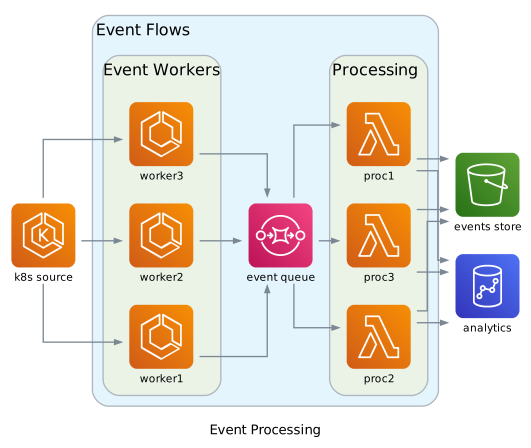
Why diagrams-js?
🌐 Runs Everywhere
Works in browsers, Node.js, Deno, and Bun. No server required for browser usage.
📦 Zero Dependencies
The core library has zero runtime dependencies. Uses WebAssembly-based Graphviz for rendering, bundled with the package.
🔷 Full TypeScript Support
Written in TypeScript with complete type definitions. Get autocompletion and type checking for all 2000+ node types.
☁️ 17 Cloud Providers
Support for AWS, Azure, GCP, Kubernetes, and 13 more providers with 2000+ pre-built node types.
🎨 Custom Nodes
Use your own icons from URLs, local files, or data URLs. Mix custom nodes with built-in provider nodes seamlessly.
🚀 Tree-Shakeable
Import only what you need. Each provider is a separate module for optimal bundle size.
Simple & Intuitive API
Define your architecture with a clean, chainable API. Create diagrams in just a few lines of code.
- Factory functions for easy diagram creation
- Chainable connections with .to(), .from(), .with()
- Cluster support for grouping related components
- Custom styling for edges and nodes
import { Diagram } from "diagrams-js";
import { EC2 } from "diagrams-js/aws/compute";
import { RDS } from "diagrams-js/aws/database";
import { ELB } from "diagrams-js/aws/network";

const diagram = Diagram("Web Architecture", {
  direction: "TB"
});

const lb = diagram.add(ELB("Load Balancer"));
const web = diagram.add(EC2("Web Server"));
const db = diagram.add(RDS("Database"));

lb.to(web).to(db);

const svg = await diagram.render();
Plugin Support
Visualize existing infrastructure by importing and exporting external formats. Official plugins are available for Docker Compose and Kubernetes.
🐳 Docker Compose
Import Docker Compose files to visualize container architectures with volumes, networks, and service dependencies.
☸️ Kubernetes
Import Kubernetes manifests to visualize Deployments, Services, StatefulSets, and cluster topology.
Ready to get started?
Check out the documentation, try the interactive playground, or browse the examples.